Bold
U+1D400𝐓𝐡𝐞 𝐪𝐮𝐢𝐜𝐤 𝐛𝐫𝐨𝐰𝐧 𝐟𝐨𝐱
IG
U+1D400 The Unicode codepoint the style's characters come from. Two styles can look almost identical and still be different characters with different device support. The codepoint is the only reliable way to tell which one you copied.
IGTTRB Platform support. Green renders reliably. Amber works, but breaks on some devices or in some fields. Struck through is filtered out or rejected by that platform.
IG Instagram · TT TikTok · DC Discord · WA WhatsApp · FB Facebook · X (Twitter) · RB Roblox
Instagram doesn't let you change your font. What it does allow is Unicode characters, and that turns out to be enough. The letters here aren't a different typeface applied to your text. They're separate characters that happen to look like styled versions of the alphabet, which is why they survive being pasted into a bio field that offers no formatting options at all. The practical consequence is that what you paste is what everyone sees, on every device, without Instagram needing to support anything.
Some people search for this as "IG fonts", same thing, same page. The abbreviation is common enough in bios and search that Worth knowing it refers to exactly what is here.
Type your text in the box above. Every style updates as you type, so you can see how a name or a bio line will actually look before committing to it. Tap the Copy button on the style you want, then open Instagram, go to Edit Profile, and paste into the Name or Bio field. On iPhone, tap and hold in the field and choose Paste. On Android, tap and hold, then choose Paste from the menu that appears. If nothing pastes, the copy didn't take: go back and tap Copy again rather than retyping.
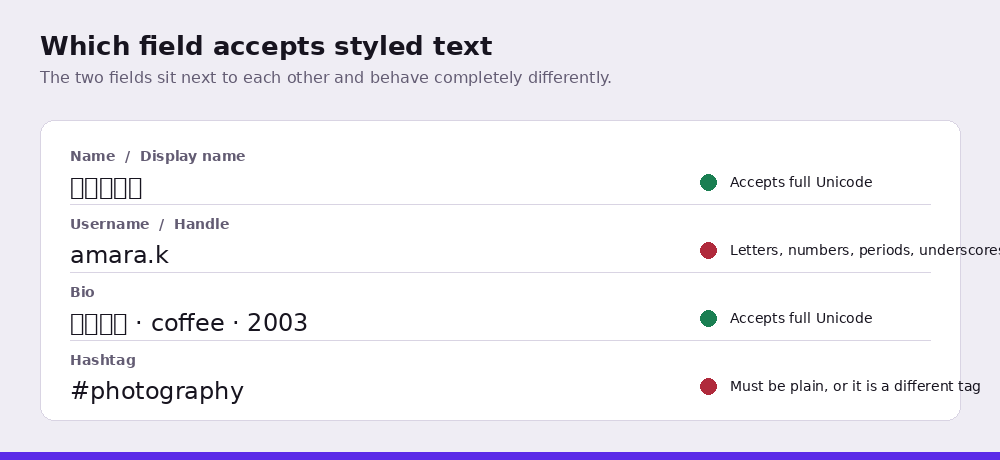
Instagram renders most Unicode styles without complaint, but the fields behave differently and Worth knowing which is which before you plan a profile. The Name field, the bold line above your bio, accepts full Unicode and is capped at 30 characters. The Username field beneath it is capped at the same 30 but accepts only letters, numbers, periods and underscores, which is why a style that works in your name is refused as a handle. The bio itself allows 150 characters. Captions run to 2,200, though only around the first 125 appear in the feed before the text is cut off with a more link, so anything styled past that point is invisible to most readers.
Two practical consequences follow. First, a caution about counting. How styled characters count against the limit depends on how the platform counts. Most styled letters live in a part of Unicode that some systems count as one character and others count as two, which is the same reason an emoji sometimes costs double. Compose the full text, paste it, and check what the field reports before you rely on the count: a bio composed at exactly 150 plain characters may not fit once styled. Fullwidth is the exception worth watching: it still counts as one character per letter but occupies roughly double the width on screen, so it wraps sooner than the character count suggests. Second, hashtags must be plain. A styled hashtag is not the same string as the plain one and will not function as a tag at all, so keep every hashtag in ordinary characters no matter how the rest of the caption is styled.
One more thing worth weighing: Instagram's search indexes the Name field. A name written entirely in decorative characters is a different string from the one people type when looking for you, so the common approach is to keep the name searchable and style the bio lines beneath it.
A box means that person's device doesn't have a font containing that character. It isn't a problem with your text or with Instagram. The characters are valid, the device just can't draw them. Older Android handsets are the most common culprit, particularly with script and fraktur styles. Bold and sans-serif styles have the widest coverage and are the safest choice if your audience skews toward older devices.
Usually not. The username field only accepts letters, numbers, full stops and underscores, and it rejects nearly all decorative Unicode. The Name field directly beneath it has no such restriction, which is where most people put styled text instead.
No. These are ordinary Unicode characters, the same ones used in mathematical typesetting, and using them in a profile is not against Instagram's terms. What can cause problems is using them to disguise words that would otherwise be moderated. The characters are legitimate, using them to evade filters is not.
It can. Instagram matches search queries against your name and username, so replacing every letter with a decorative variant means someone typing your name normally may not find you. If discoverability matters, keep the Name field readable and style the bio instead.
Because it isn't the same hashtag. A styled character is a separate Unicode character from its plain equivalent, so a decorative version of a tag is an entirely different string and won't join the plain tag's feed. Keep hashtags in ordinary characters; style the rest of the caption if you want to.
Possibly, and it is worth checking rather than assuming. How styled characters count against the limit depends on how the platform counts. Most styled letters live in a part of Unicode that some systems count as one character and others count as two, which is the same reason an emoji sometimes costs double. Compose the full text, paste it, and check what the field reports before you rely on the count. Fullwidth is the one to watch. It still counts as one character per letter, but each letter occupies about twice the width on screen, so your text wraps earlier than the count suggests.